
Meaning
“Remaining” could mean budget, prepaid balance, or a session allowance. I explored stable positions for provider cost, the builder’s limit, and provider-specific information.
BuildMeter / Selected work
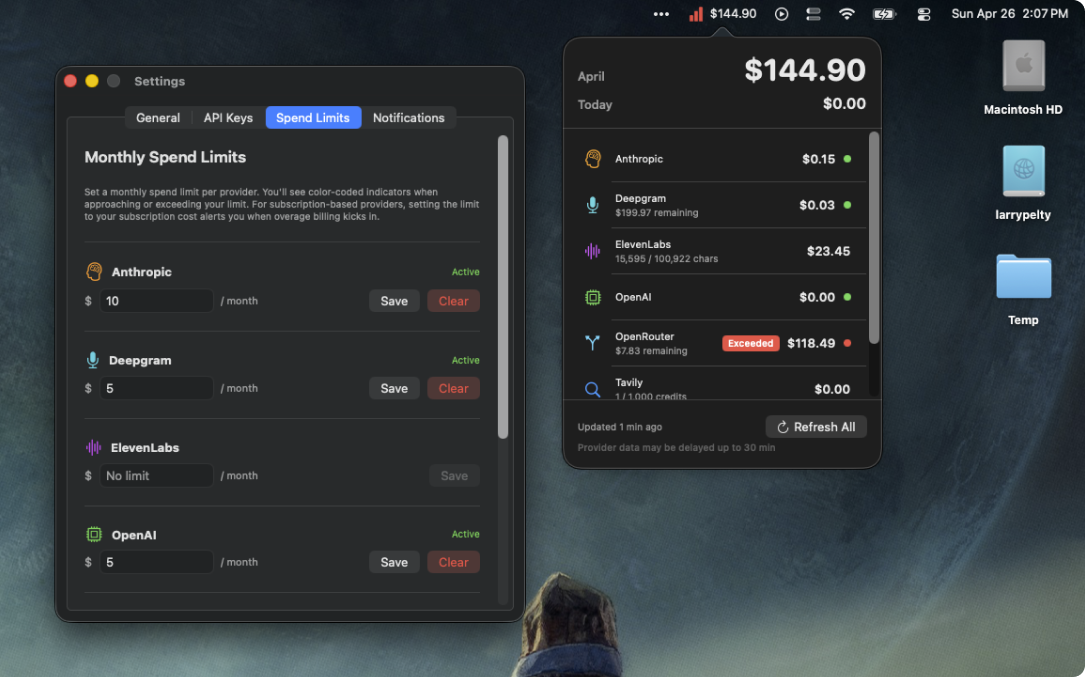
I designed and built a macOS menu bar app that brings seven AI providers into one cost view. Building it also became the proving ground for an evolving agentic workflow.
Solo product builder · Product / SwiftUI / AI workflow · TestFlight beta
A working native macOS app and release pipeline.
Independent AI services brought into one cost view.
From the start of the project to TestFlight.
Release and development milestones recorded in the presentation; customer adoption and impact are still to be established.
Before BuildMeter, I used AI to accelerate research synthesis, exploration, and prototyping within a familiar design process. Building this app took that further: agents became part of planning, implementation, critique, and verification. The product’s needs helped shape the workflow as I went.
01 / The product problem
My own AI product work and agent experiments spread usage across multiple providers, each billing independently. Checking cost meant logging into a dashboard, re-authenticating, finding a number, and repeating the process elsewhere. Spend could accumulate faster than I checked it.
I wanted a glanceable macOS menu bar app: seven providers, one cost view. I owned the product decisions, design, implementation, testing, and release process, working with AI throughout.
Providers measured usage in tokens, characters, credits, and prepaid dollars. Authentication, spend-limit access, and reporting latency varied. At the start, I did not understand that landscape—and the AI research had not exposed the depth of it either.
I asked surface-level questions and got rich-looking, surface-level answers. Even what I thought was deep research was not deep enough. The project became a sequence of correcting those misses. Context and concrete checks mattered more than the apparent completeness of an answer.
02 / Building to beta
I researched macOS practices, existing products, access to provider cost data, and a Swift code-to-design-to-code workflow. The search surfaced an old Figma-to-Swift plugin, but no workable loop for this project. I deliberately began with design in code—an approach I had not used before.
With agent support newly available in the Xcode beta, I built one small chunk at a time: an icon, an empty popover, then one layer of functionality. I tested each layer as it appeared.
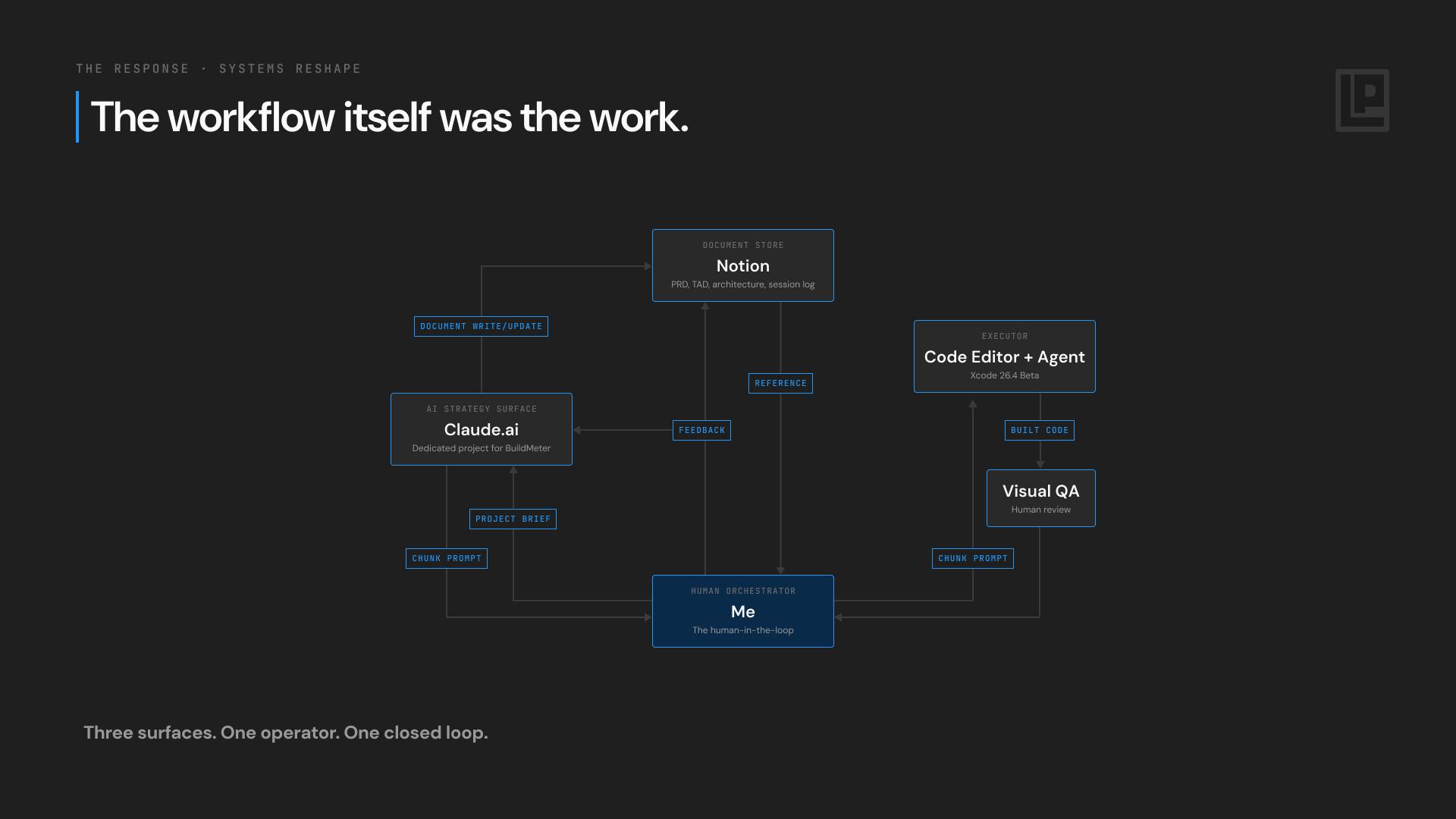
A dedicated Claude.ai project supported planning. An agent inside Xcode implemented scoped chunks. Notion held the requirements, architecture, and session log. I carried prompts into the editor, reviewed the running app, and brought observations back into planning.
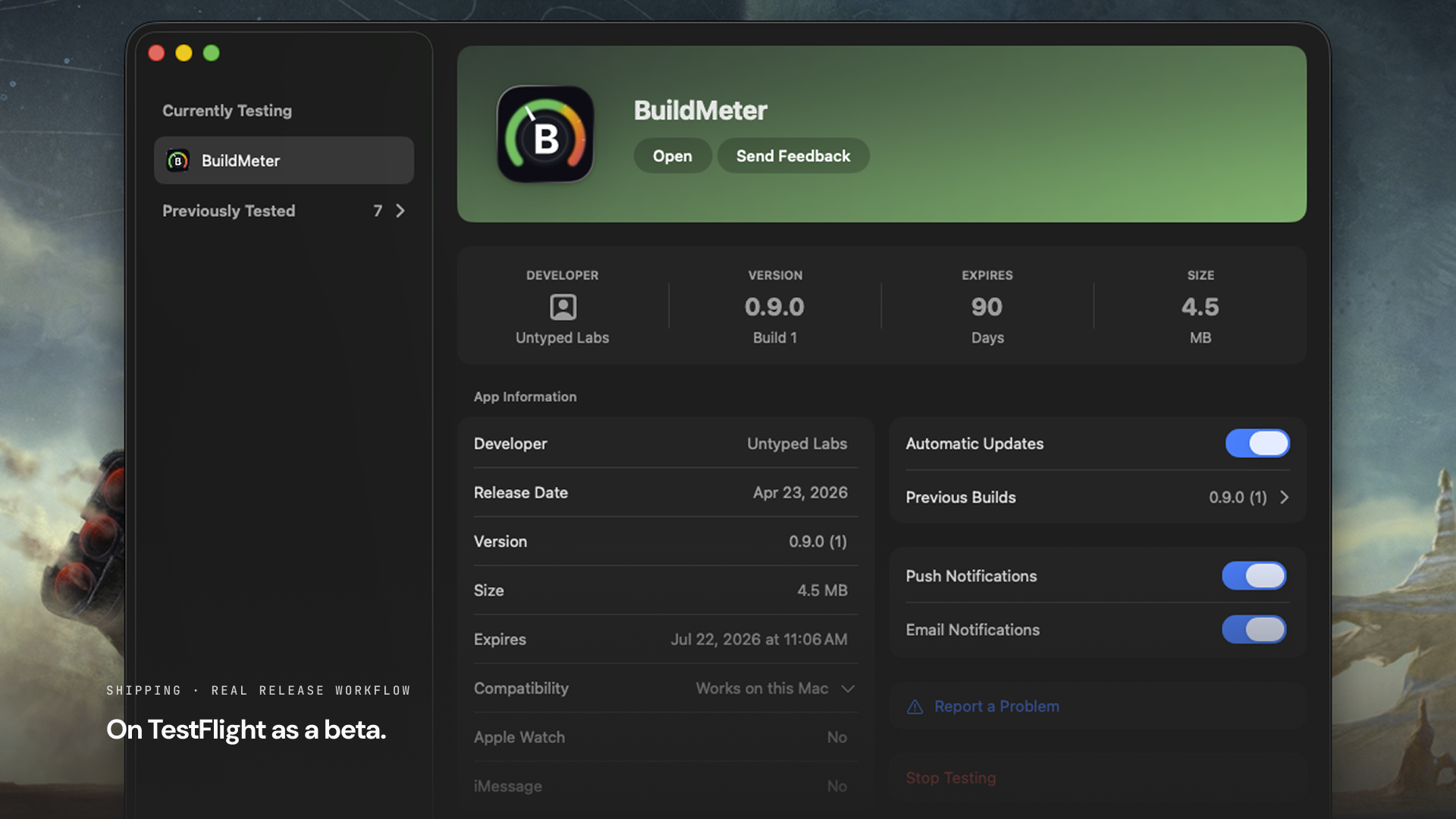
BuildMeter brought Anthropic, OpenAI, OpenRouter, xAI, ElevenLabs, Deepgram, and Tavily into a dollar-based view. The project reached a TestFlight beta with a working macOS app and release pipeline.
Product evidence / Running app
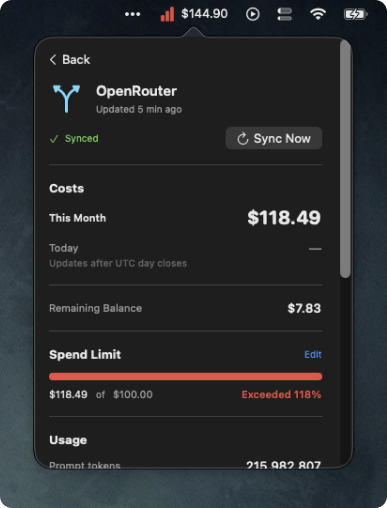
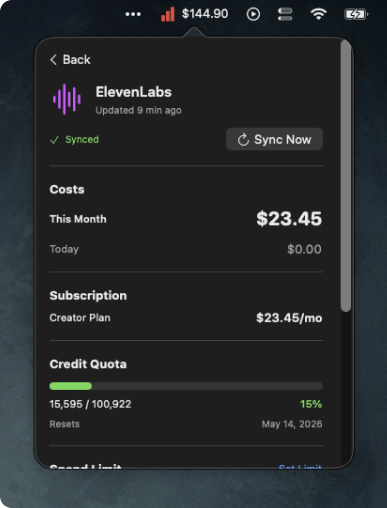
The overview brought spend together; the detail screens retained the context needed to interpret it. These running-app screens show why a single dollar total was only the starting point.
03 / An agentic workflow
BuildMeter exposed the limits of carrying every prompt, handoff, and check myself. Its development became a practical setting for evolving an agentic workflow: how to give agents useful context, divide the work, and verify their results before making the next product decision.
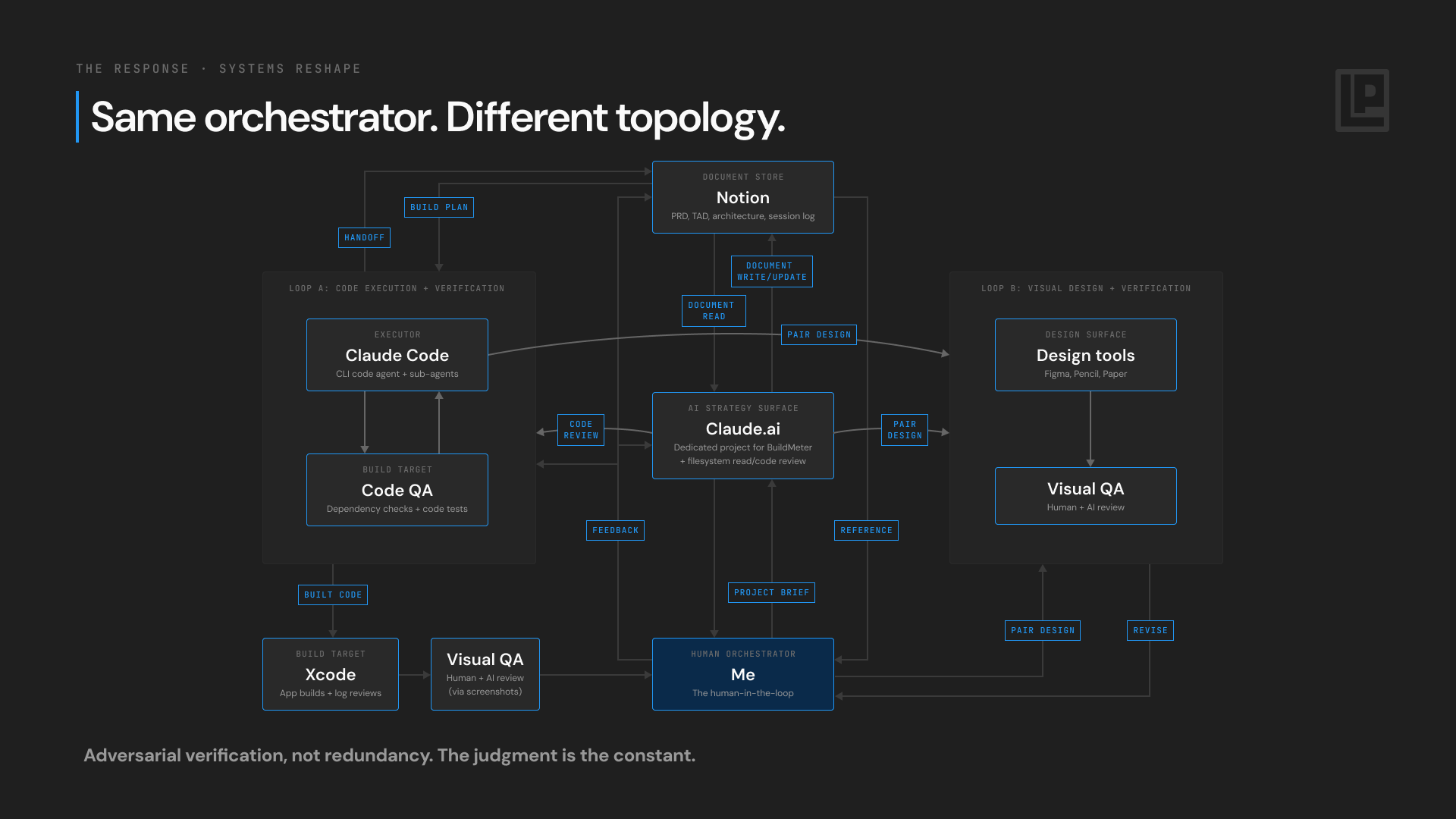
As the work grew, I separated code verification from visual verification. CLI agents could inspect source and dependencies. Figma and Pencil could reproduce the running interface for visual critique. Notion became a live shared reference for briefs, skills, handoffs, and decisions.
When an agent said an issue was fixed but I could still see it, an independent source review helped resolve the disagreement. I arbitrated between code evidence and the visible experience. The design loop used a visual representation of the app; it was not a lossless conversion of Swift source into editable design and back.
For the next provider-card iteration, an AI collaborator proposed building a SwiftUI scaffold while exploring three visual variations in parallel. I pushed back. If the cards turned out too bulky or complex, that implementation would be wasted.
I made design validation a gate before code, and required one variation that challenged the preferred direction. The agent’s own critique later found that skeptical alternative competitive on glanceability. More output was not the goal; a better-supported decision was.
A command-line test tool made provider differences concrete. The next interface needed to make those differences understandable rather than hide them behind uniform-looking cards.
“Remaining” could mean budget, prepaid balance, or a session allowance. I explored stable positions for provider cost, the builder’s limit, and provider-specific information.
Some data was intraday; some was delayed or excluded today. Missing could not become zero. Accumulating, subject-to-adjustment, and unavailable values needed distinct treatment.
The Anthropic and OpenAI APIs I worked with did not expose console-set spend limits. A BuildMeter limit could provide a monitoring signal, without implying control over provider billing.
Design evidence / Proposed iteration
The exploration tests both configured and unconfigured limits. It also makes room for rate limiting, retries, server errors, and balance information without changing where the main cost and limit information live. Those states mattered because a compact card still needed to explain what the app knew—and when the data could not be trusted or was not available.
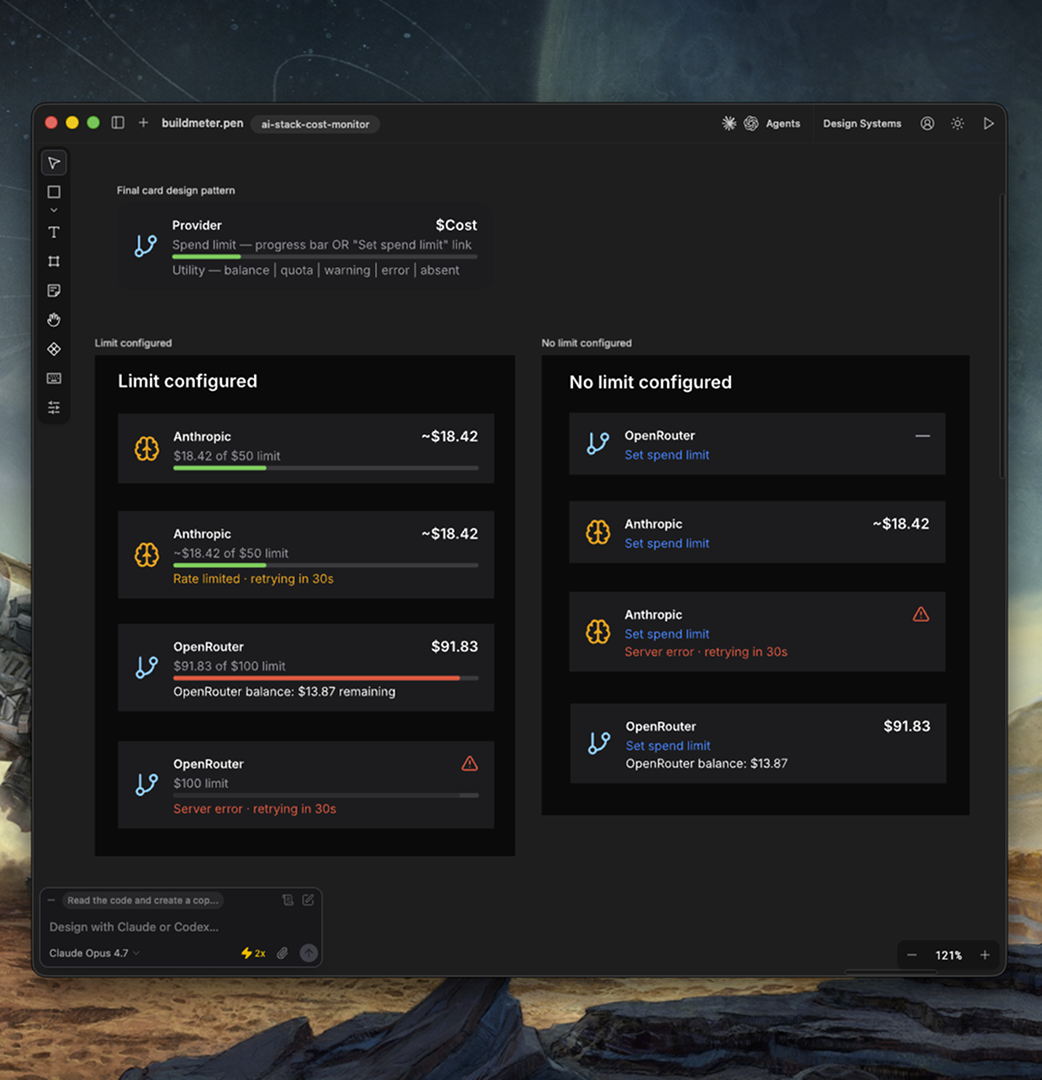
The proposed three-layer provider-card pattern was still a hypothesis. Reaching TestFlight established that I could build and release the product; it did not establish that the next design solved the problem for other people. Beta learning and validation needed to shape what came next.
04 / What BuildMeter changed
BuildMeter was part of a wider year of experimentation, and a concrete place to put that learning to work. Each shift answered a limitation in the previous setup. AI began alongside the work, became an agent inside the editor, then separated into strategy and execution. Context discipline, parallel agents, and codified working patterns followed. Design validation and direct source inspection shortened the distance between a claim and something I could verify.
The app and the workflow developed together. Product problems exposed gaps in the process; better context, critique, and verification helped me return to those problems with stronger evidence.
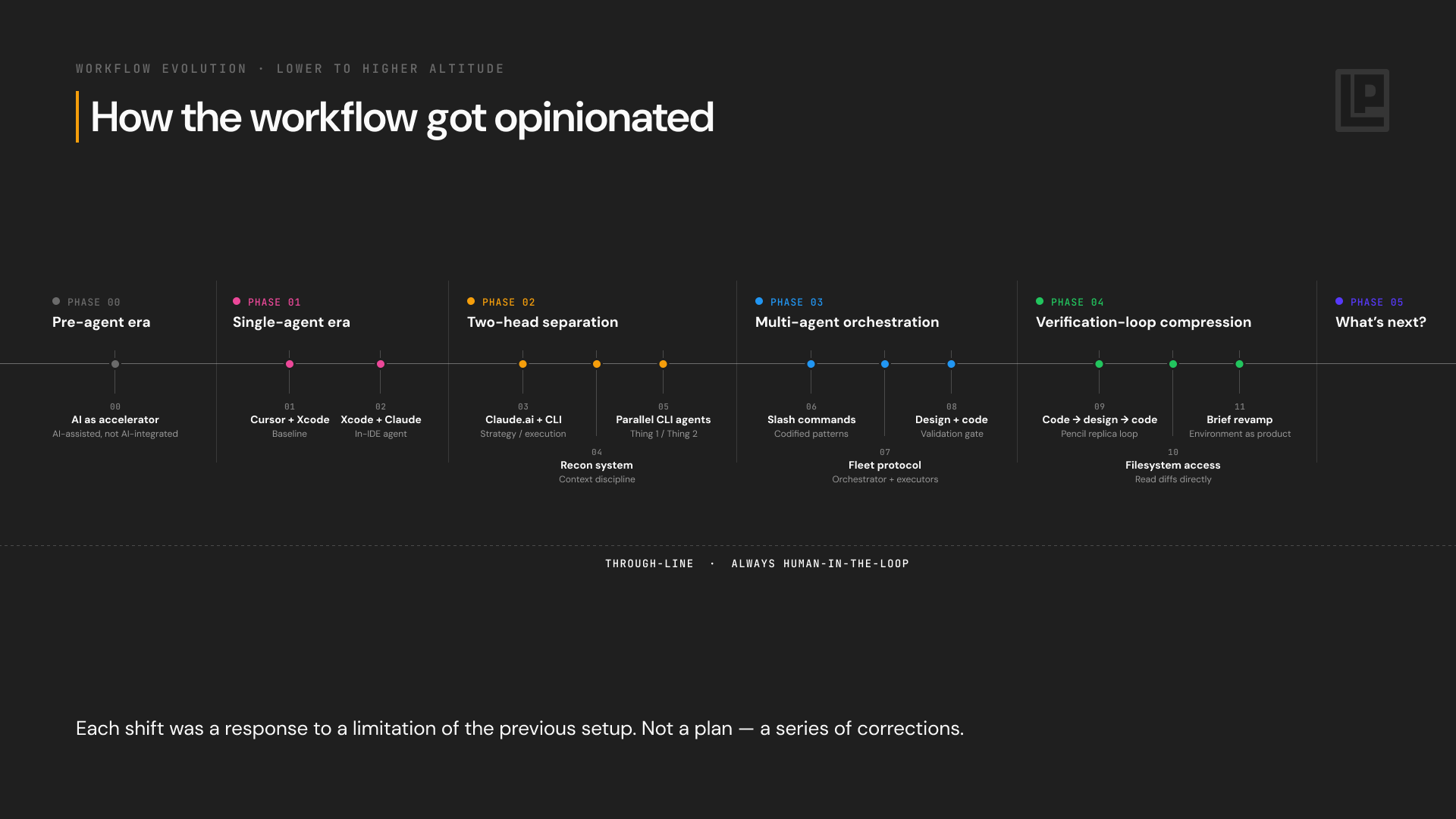
The five stages below trace that progression, from using AI within an existing process to coordinating agents and checking their work. Each change responded to a limitation I encountered. BuildMeter gave me a concrete product against which to test those changes, and the experience gradually shaped my views on how I would build with AI and help a team work with it.
Building BuildMeter made me more opinionated about working with AI because I had to live with the consequences of the decisions. I saw where agents helped me move faster, where incomplete context produced convincing but shallow answers, and where a claimed fix still needed to be checked in the running product. That is what “always human in the loop” means to me: I remain responsible for framing the problem, deciding what good looks like, challenging the proposed direction, and judging whether the evidence supports moving forward.
That experience also changed how I think about leadership. I expect leaders to manage token use alongside headcount as model work becomes part of how teams deliver. Decisions about which work to delegate, which models to use, and how much iteration and verification a task deserves will affect both cost and quality. BuildMeter made that cost visible in my own practice; the broader question is how teams will make those choices deliberately.
My starting position for helping a team through this transition is to make AI fluency part of the work itself. I would pair with designers, work through real problems together, and make the reasoning behind decisions visible. Shared expectations for briefs, deliverables, and verification would give people a foundation they could practice and improve together.
I am still working out how much of that practice should be standardized. People have different appetites, learn at different speeds, and find different tools useful. A larger team also needs enough consistency to collaborate and trust the work it produces. BuildMeter gave me practical experience to draw on and a clearer position to test. How I would balance that consistency with room for individual approaches is a question I would continue to work through with the team.